
GUIDES
Generate Structured Text for CODESYS with AI
Writing Structured Text with a chat assistant means copying code back and forth and fixing compiler errors by hand. Connected to the IDE, an AI agent writes the code directly into your CODESYS project, compiles it and keeps fixing until the build is clean. This guide shows how that works and where the limits are.
What the AI writes
With Rung Coder the AI works on the project that is open in CODESYS, so it sees the data types, variables and libraries that are already there and builds on them instead of guessing.
- Programs, function blocks and functions, with methods, properties and interfaces.
- Data types (DUTs): structures, enumerations, aliases and unions.
- Global variable lists (GVLs), including arrays, initial values and STRING literals.
- Changes to existing code: edits to a POU, a GVL or a DUT, and renaming a symbol across the code; bindings in tasks and visualizations that still use the old name are listed for you to update.
- Libraries: adds the libraries the code needs and installs missing ones.
From prompt to a clean build
- You describe the behaviour in plain language, or point the AI at an existing POU to extend.
- The AI reads the relevant parts of the project and creates or edits the objects.
- Rung Coder rebuilds the project in the real IDE and returns the compiler messages unchanged.
- The AI fixes the errors and rebuilds. A build only counts as done at 0 errors and 0 warnings; a warning that cannot be fixed, for example one inherent to a third-party library, is reported to you instead of hidden.
- Once you grant full control, the program can be downloaded and checked on the controller with live variables.
An example prompt
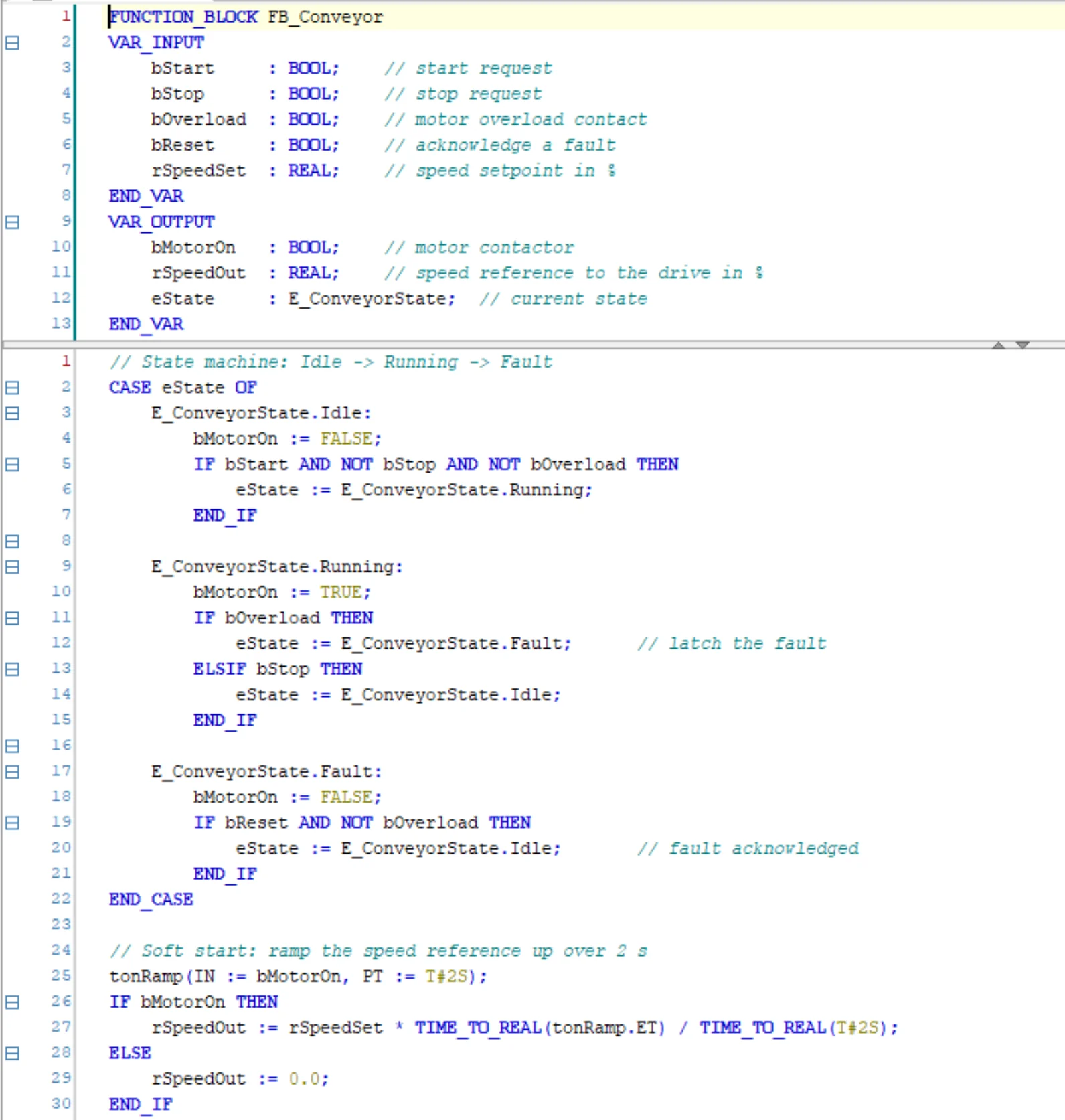
Specific prompts get specific code. Name the signals, the states and the timing you expect. This prompt produced the function block in the screenshot:
Create a function block FB_Conveyor with inputs bStart, bStop, bOverload, bReset and rSpeedSet,
and outputs bMotorOn and rSpeedOut.
Use a state machine with the states Idle, Running and Fault (as an enumeration).
An overload latches Fault until bReset. Ramp the speed up over 2 s after start.
Call it from PLC_PRG, compile, and fix everything until there are 0 errors and 0 warnings.
Working on an existing project
The AI can open an existing .project file, read its structure and the code of each POU, and then add to it or change it. Before its first change, Rung Coder saves a baseline of the whole project, so you can compare what the AI did at object and line level and roll back in one click.
For larger refactorings, ask for the change in steps and review the diff after each one, as you would with a colleague's commit.
Limits
A clean build proves syntax and references, not process logic. Review timing and interlocks yourself, and test on a simulator or spare hardware before running the code on a machine. Safety functions such as an emergency stop must not be written with Rung Coder.
Structured Text is the default language. If your plant standardises on Ladder Diagram, see AI for Ladder Logic in CODESYS.
Try it on your own CODESYS project
Rung Coder is free for 2 months from your first sign-in, with no payment method needed. Windows 10/11 and CODESYS V3.5 SP18 or newer.