
GUIDES
AI for Ladder Logic (LD) in CODESYS
Many machines and plants are standardised on Ladder Diagram, and most AI tools for CODESYS only write Structured Text. Rung Coder lets the AI create real LD networks and edit single rungs of existing ladder code. This guide lists what is supported and how each change is checked.
What the AI can draw
Ladder Diagram is used when you ask for it. Without an explicit request, new code is written in Structured Text.
- Contacts: normally open, normally closed, and rising or falling edge.
- Series (AND) and parallel (OR) logic, including seal-in circuits.
- Coils: normal, set, reset and negated; one rung can drive several coils.
- Compare and math boxes such as GT, LT, EQ, ADD, MUL, MOVE, LIMIT and SEL, with or without an enable input.
- Function blocks such as TON and CTU and library blocks, with each output pin wired to its own coil or variable.
- Jumps, labels, returns, network titles and comments.
Editing existing ladder code
The AI can read an LD POU as a model of rungs, contacts, coils and boxes, so it understands graphical code that has no text form. To change it, it edits one network at a time, appending, inserting, updating or deleting it, and leaves every other network, the declaration, actions and methods exactly as they were. LD actions and LD methods can be edited the same way, and new LD actions can be added.
How each change is checked
- The rung is described in a structured form and written into the CODESYS ladder editor.
- Rung Coder then reads the rung back from CODESYS and compares it with what was intended.
- If what CODESYS stored differs from what was written, the change is removed again rather than left half-applied.
- The project is rebuilt; errors and warnings are fixed as with any other code.
An example prompt
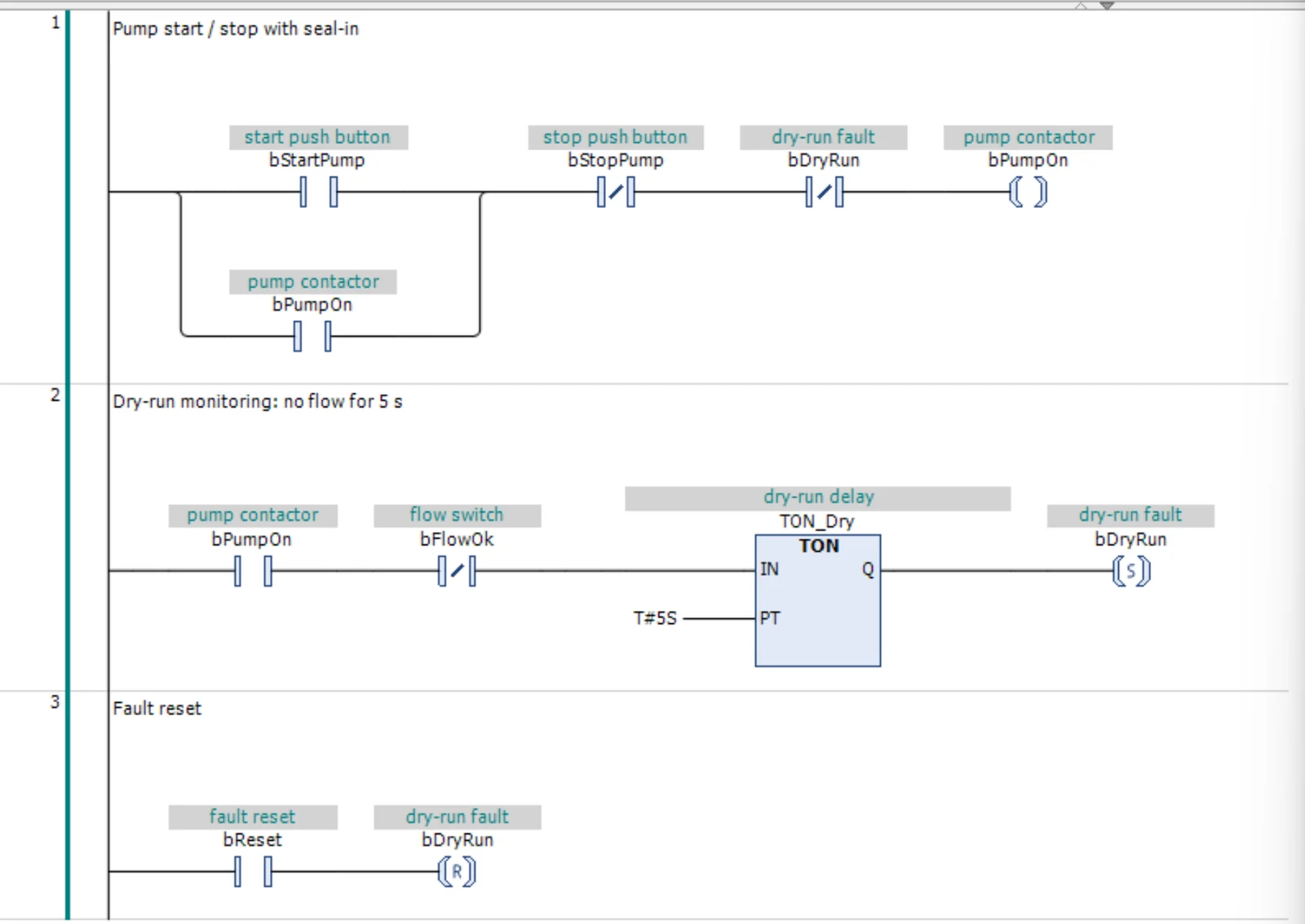
Create an LD program PRG_LD_Pump:
network 1: bStartPump OR bPumpOn (seal-in), AND NOT bStopPump, AND NOT bDryRun -> coil bPumpOn.
network 2: TON_Dry with IN := bPumpOn AND NOT bFlowOk, PT := T#5S; Q -> set coil bDryRun.
network 3: bReset -> reset coil bDryRun.
Compile until there are 0 errors and 0 warnings.
Limits
Rung editing works with the current CODESYS LD editor; ladders made in the older combined FBD/LD/IL editor can be read but not changed. Each network holds at most one box or function block. The full feature set is verified on CODESYS V3.5 SP22. For the other graphical languages (FBD, CFC and SFC) the AI can create the objects and their declarations, but writes the implementation only in ST or LD.
The official CODESYS MCP Server can read graphical languages but not create or modify them; see the comparison.
Try it on your own CODESYS project
Rung Coder is free for 2 months from your first sign-in, with no payment method needed. Windows 10/11 and CODESYS V3.5 SP18 or newer.